
Below we explain how to start a Smile Design in the software MovumStudio®.
Before starting with the Smile Design, it will be necessary to have previously loaded the photographs and STLs of the patient in their corresponding folder in the Case Administrator as we explained HERE.
1️⃣ Navigate to the dropdown menu on the left and click on the module Smile Design.

2️⃣ Select the patient for whom you want to perform a Smile Design and click on Create a new case. You can also resume a previously created case.

3️⃣ On this screen you must load the patient files as we show in the following video. Once you have successfully uploaded the files, you must click on the button AND.
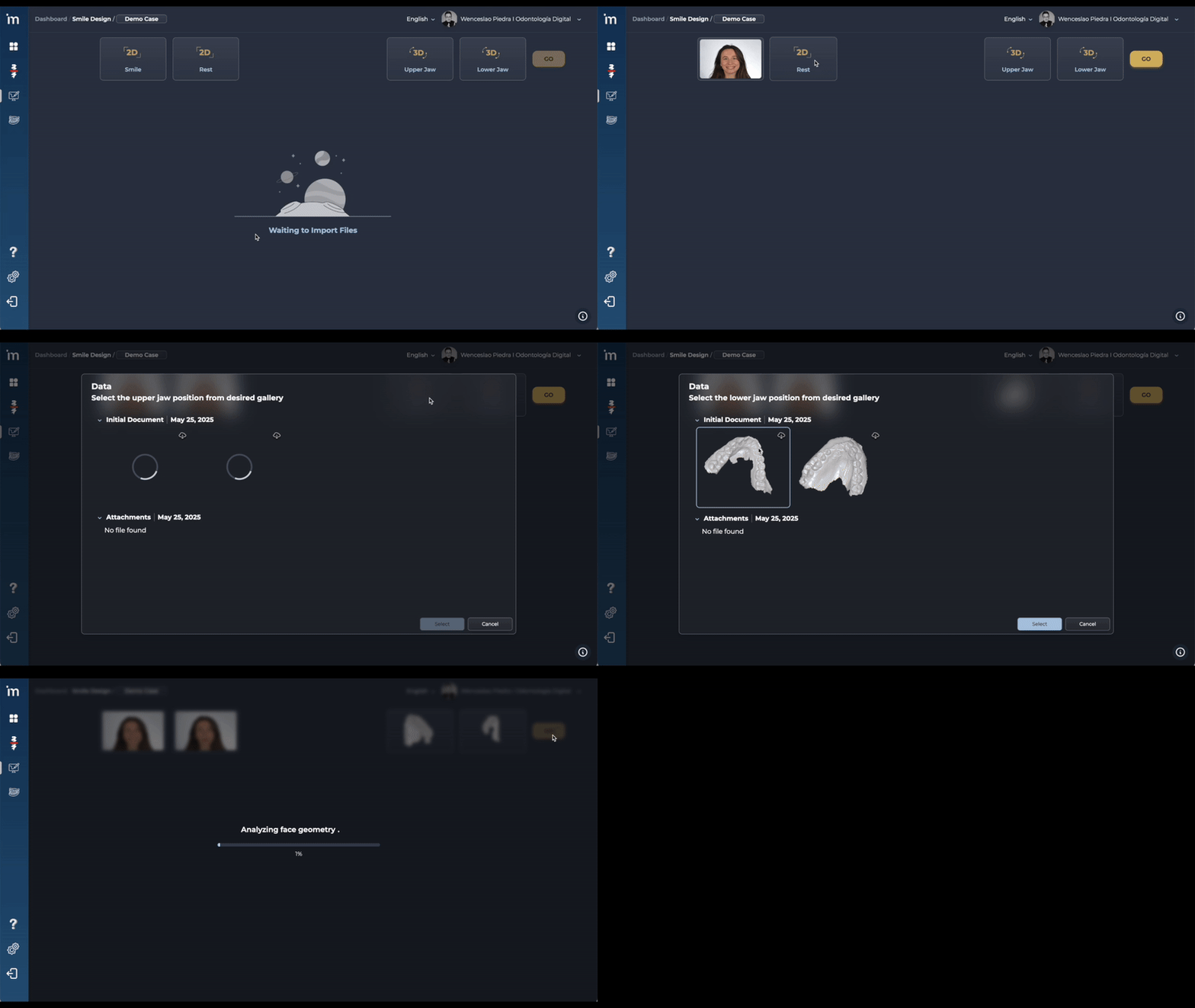
The multiple Artificial Intelligence algorithms of Smile Design’s Smile Design software will be activated, guiding you through a step-by-step protocol.
➡️ Continue to Horizontal Reference Plane
ℹ️ FAQs
1. Is it necessary to upload files to all boxes?
No. It is not necessary to complete all the boxes. There are mandatory files and others optional.
- Mandatory file: Frontal smile photography. It is essential to be able to carry out the Smile Design. Without this image, the system will not be able to generate the analysis.
- Optional files: Still photography and 3D files (STL).
2. How can the accuracy of Smile Design be improved?
Uploading the corresponding information in each of the boxes. If you do not upload a resting photograph of the patient and STL files, the algorithms do not have enough information to perform a correct facial and smile analysis. You will get an approximate result.
3. My patient does not show teeth when smiling or shows very few teeth. Can I use a photograph with separators instead of a photograph of a normal smile?
No, in the smile photo box you can only upload an image of the patient smiling. If you upload a photo with dividers, the algorithm will not understand the image and the final result may not be as expected.
*In future versions of the software we will introduce boxes to be able to use additional photographs.
4. Can photographs taken with the smartphone?
Yes, our Artificial Intelligence algorithms are capable of working with photographs taken with a smartphone. However, you must have at least two considerations: have good lighting to take the photograph and take the photograph with the 2x lens.