
Help Center
  • Create Account
  • Invoices
  • Payment Methods
  • Subscriptions Plans
  • Modify Subscription Plan
  • Change Password
  • Delete Account
  • Sharing a case
  • Upload Files
  • Create New Gallery
  • Move Files
  • How it works?
  • Collaborate
  • Expected Results
  • X-rays
  • Create Case
  • Horizontal Reference Plane
  • Facial Midline
  • Lip/Teeth Segmentation
  • Rest-Smile Alignment
  • STL Projection
  • Controls
  • Teeth Libraries
  • Measurements
  • Finishing the Case
  • Introduction and First Steps
  • Groups
  • Cast Creation
  • Align
  • Virtual Tooth Extraction
  • Boolean Operations
  • 2D Cut
  • Tools
  • Web Browser
  • Computer

Invoices

This is important

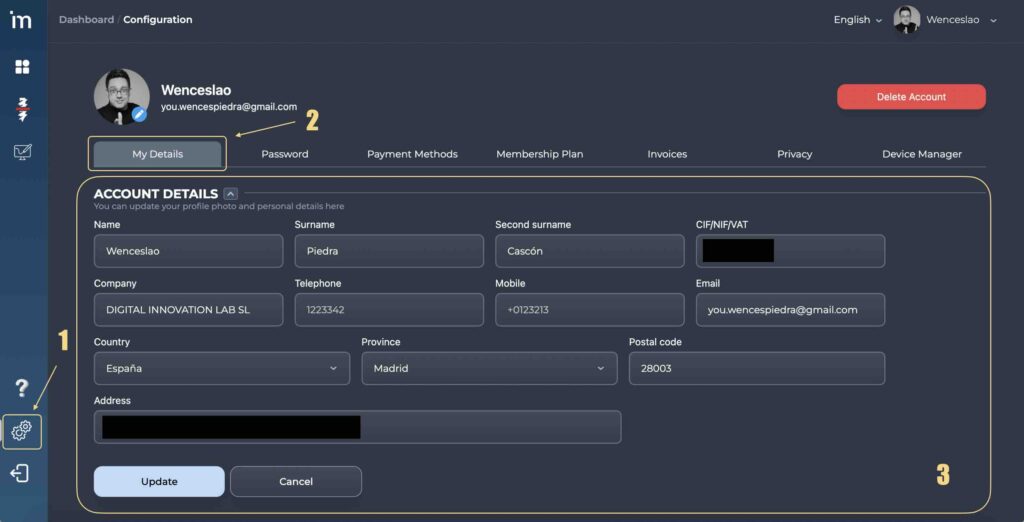
First of all, it is important that you have updated the information in your User Panel, since invoices will be automatically generated from this information.

​1️⃣​ Access to you User Panel and complete the information requested on the panel My Details.
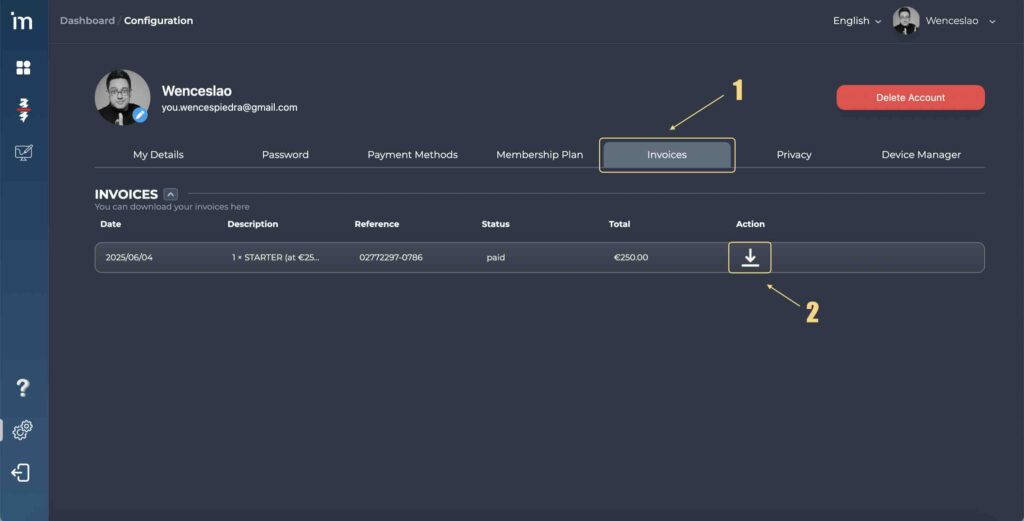
2️⃣ When you subscribe to one of our subscription plans, all your available invoices will be auto-generated, and you will find them in the panel Invoices from where you can download them.
On this page
    • English
    • Español
    © 2026